 Arthas
Arthas 是一款线上监控诊断产品,通过全局视角实时查看应用 load、内存、gc、线程的状态信息,并能在不修改应用代码的情况下,对业务问题进行诊断,包括查看方法调用的出入参、异常,监测方法执行耗时,类加载信息等,大大提升线上问题排查效率。
# 1. 部署Arthas Tunnel (opens new window)
apiVersion: apps/v1
kind: Deployment
metadata:
  labels:
    app: arthas-tunnel
  name: arthas-tunnel-server
spec:
  replicas: 1
  selector:
    matchLabels:
      app: arthas-tunnel
  strategy:
    rollingUpdate:
      maxSurge: 25%
      maxUnavailable: 25%
    type: RollingUpdate
  template:
    metadata:
      labels:
        app: arthas-tunnel
    spec:
      containers:
      - image: registry.cn-hangzhou.aliyuncs.com/s-ops/arthas-tunnel-server:v3.6.6
        imagePullPolicy: IfNotPresent
        name: arthas-tunnel
        ports:
        - containerPort: 8080
          name: http-web-svc
          protocol: TCP
        - containerPort: 7777
          name: http-agent-svc
          protocol: TCP
        resources:
          limits:
            cpu: 500m
            memory: 1024Mi
          requests:
            memory: 1024Mi
1
2
3
4
5
6
7
8
9
10
11
12
13
14
15
16
17
18
19
20
21
22
23
24
25
26
27
28
29
30
31
32
33
34
35
36
37
38
2
3
4
5
6
7
8
9
10
11
12
13
14
15
16
17
18
19
20
21
22
23
24
25
26
27
28
29
30
31
32
33
34
35
36
37
38
# 2. agent启动
$ curl -O https://arthas.aliyun.com/arthas-boot3.jar
$ java -jar /opt/arthas-boot.jar --tunnel-server 'ws://arthas.demo.com:7777/ws' --target-ip 0.0.0.0 --password 12345
### attach 成功之后,会打印出 agentId,比如:
  ,---.  ,------. ,--------.,--.  ,--.  ,---.   ,---.
 /  O  \ |  .--. ''--.  .--'|  '--'  | /  O  \ '   .-'
|  .-.  ||  '--'.'   |  |   |  .--.  ||  .-.  |`.  `-.
|  | |  ||  |\  \    |  |   |  |  |  ||  | |  |.-'    |
`--' `--'`--' '--'   `--'   `--'  `--'`--' `--'`-----'


wiki      https://arthas.aliyun.com/3.x/doc
tutorials https://arthas.aliyun.com/3.x/doc/arthas-tutorials.html
version   3.1.2
pid       86183
time      2019-08-30 15:40:53
id        URJZ5L48RPBR2ALI5K4V
1
2
3
4
5
6
7
8
9
10
11
12
13
14
15
16
2
3
4
5
6
7
8
9
10
11
12
13
14
15
16
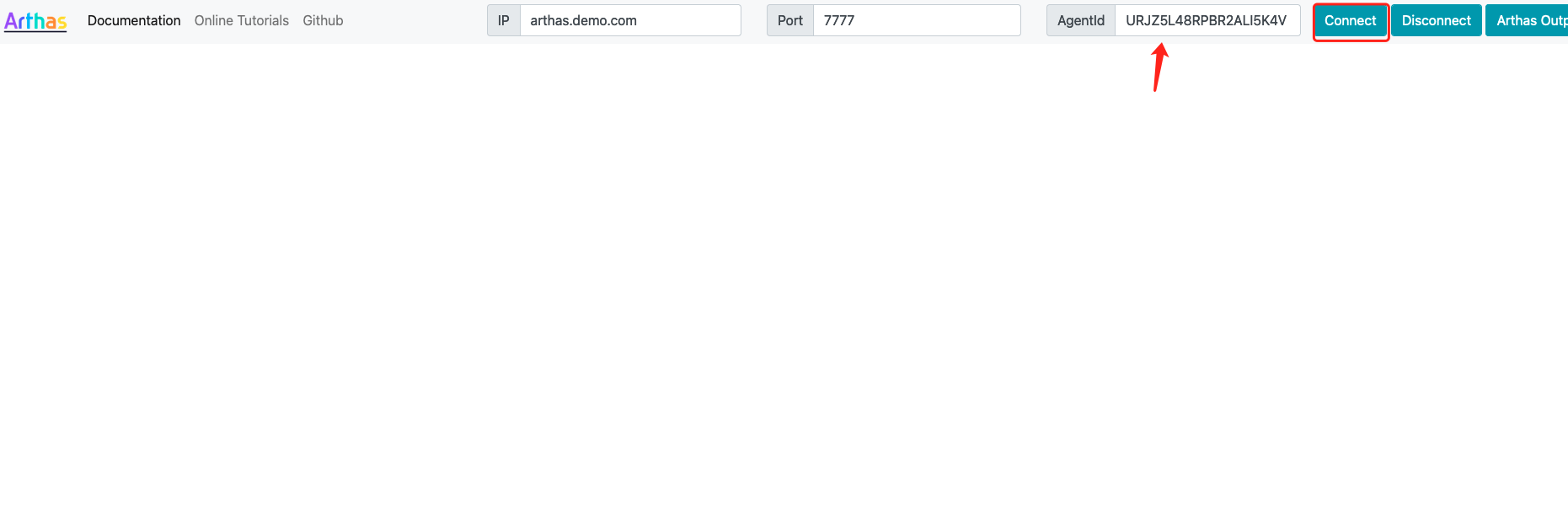
# 3. Java服务CPU占用高排查
- 用arthas定位
[arthas@7]$ thread -n 3
"lettuce-epollEventLoop-5-1" Id=153 cpuUsage=70.86% deltaTime=144ms time=2443503653ms RUNNABLE
    at io.netty.util.concurrent.SingleThreadEventExecutor.execute(SingleThreadEventExecutor.java:838)
    at io.netty.util.concurrent.SingleThreadEventExecutor.lazyExecute0(SingleThreadEventExecutor.java:831)
    at io.netty.util.concurrent.SingleThreadEventExecutor.lazyExecute(SingleThreadEventExecutor.java:822)
    at io.netty.util.concurrent.AbstractScheduledEventExecutor.removeScheduled(AbstractScheduledEventExecutor.java:309)
    at io.netty.util.concurrent.ScheduledFutureTask.cancel(ScheduledFutureTask.java:190)
    at io.lettuce.core.protocol.CommandExpiryWriter.lambda$potentiallyExpire$1(CommandExpiryWriter.java:185)
    at java.util.concurrent.CompletableFuture.uniWhenComplete(CompletableFuture.java:774)
    at java.util.concurrent.CompletableFuture$UniWhenComplete.tryFire(CompletableFuture.java:750)
    at java.util.concurrent.CompletableFuture.postComplete(CompletableFuture.java:488)
    at java.util.concurrent.CompletableFuture.complete(CompletableFuture.java:1975)
    at io.lettuce.core.protocol.AsyncCommand.completeResult(AsyncCommand.java:122)
    at io.lettuce.core.protocol.AsyncCommand.complete(AsyncCommand.java:111)
    at io.lettuce.core.protocol.CommandWrapper.complete(CommandWrapper.java:63)
    at io.lettuce.core.protocol.CommandHandler.complete(CommandHandler.java:747)
    at io.lettuce.core.protocol.CommandHandler.decode(CommandHandler.java:682)
    at io.lettuce.core.protocol.CommandHandler.channelRead(CommandHandler.java:599)
    at io.netty.channel.AbstractChannelHandlerContext.invokeChannelRead(AbstractChannelHandlerContext.java:442)
    at io.netty.channel.AbstractChannelHandlerContext.invokeChannelRead(AbstractChannelHandlerContext.java:420)
    at io.netty.channel.AbstractChannelHandlerContext.fireChannelRead(AbstractChannelHandlerContext.java:412)
    at io.netty.channel.DefaultChannelPipeline$HeadContext.channelRead(DefaultChannelPipeline.java:1410)
    at io.netty.channel.AbstractChannelHandlerContext.invokeChannelRead(AbstractChannelHandlerContext.java:440)
    at io.netty.channel.AbstractChannelHandlerContext.invokeChannelRead(AbstractChannelHandlerContext.java:420)
    at io.netty.channel.DefaultChannelPipeline.fireChannelRead(DefaultChannelPipeline.java:919)
    at io.netty.channel.epoll.AbstractEpollStreamChannel$EpollStreamUnsafe.epollInReady(AbstractEpollStreamChannel.java:800)
    at io.netty.channel.epoll.EpollEventLoop.processReady(EpollEventLoop.java:499)
    at io.netty.channel.epoll.EpollEventLoop.run(EpollEventLoop.java:397)
    at io.netty.util.concurrent.SingleThreadEventExecutor$4.run(SingleThreadEventExecutor.java:997)
    at io.netty.util.internal.ThreadExecutorMap$2.run(ThreadExecutorMap.java:74)
    at io.netty.util.concurrent.FastThreadLocalRunnable.run(FastThreadLocalRunnable.java:30)
    at java.lang.Thread.run(Thread.java:826)
1
2
3
4
5
6
7
8
9
10
11
12
13
14
15
16
17
18
19
20
21
22
23
24
25
26
27
28
29
30
31
32
2
3
4
5
6
7
8
9
10
11
12
13
14
15
16
17
18
19
20
21
22
23
24
25
26
27
28
29
30
31
32
# 1. 背景
root@service-paas-alarm-cfdc7574-c5cnn:/api# top
····
    PID USER      PR  NI    VIRT    RES    SHR S  %CPU  %MEM     TIME+ COMMAND
      7 root      20   0 8563404   1.8g 128664 S 191.7   5.9 126376:11 java
# 2.top -Hp 7 查看下进程中的线程资源占用情况
root@service-paas-alarm-cfdc7574-c5cnn:/api# top -Hp 7
···
    PID USER      PR  NI    VIRT    RES    SHR S  %CPU  %MEM     TIME+ COMMAND
    153 root      20   0 8563404   1.8g 128664 R  24.6   5.9  40727:51 lettuce-epollEv
    252 root      20   0 8563404   1.8g 128664 S   4.0   5.9   9563:42 typrod_customer
    157 root      20   0 8563404   1.8g 128664 S   1.6   5.9   3156:47 lettuce-eventEx
    159 root      20   0 8563404   1.8g 128664 S   1.6   5.9   3133:35 lettuce-eventEx
    160 root      20   0 8563404   1.8g 128664 S   1.6   5.9   3158:37 lettuce-eventEx
    249 root      20   0 8563404   1.8g 128664 R   1.6   5.9 464:40.40 typrod_customer
    329 root      20   0 8563404   1.8g 128664 S   1.6   5.9   1464:27 alarm-event-1
    343 root      20   0 8563404   1.8g 128664 S   1.6   5.9   1462:21 alarm-event-15
    348 root      20   0 8563404   1.8g 128664 S   1.6   5.9   1471:30 alarm-event-20
    349 root      20   0 8563404   1.8g 128664 S   1.6   5.9   1465:33 alarm-event-21
     20 root      20   0 8563404   1.8g 128664 R   0.8   5.9 374:14.95 JIT Sampler
    158 root      20   0 8563404   1.8g 128664 S   0.8   5.9   3158:49 lettuce-eventEx
    180 root      20   0 8563404   1.8g 128664 S   0.8   5.9   1845:40 disruptor-event
    258 root      20   0 8563404   1.8g 128664 S   0.8   5.9 143:19.49 typrod_customer
    306 root      20   0 8563404   1.8g 128664 S   0.8   5.9  59:00.73 kafka-coordinat
    330 root      20   0 8563404   1.8g 128664 S   0.8   5.9   1464:20 alarm-event-2
    331 root      20   0 8563404   1.8g 128664 S   0.8   5.9   1470:47 alarm-event-3
    332 root      20   0 8563404   1.8g 128664 S   0.8   5.9   1471:13 alarm-event-4
    333 root      20   0 8563404   1.8g 128664 S   0.8   5.9   1463:51 alarm-event-5
    334 root      20   0 8563404   1.8g 128664 S   0.8   5.9   1465:10 alarm-event-6
    335 root      20   0 8563404   1.8g 128664 S   0.8   5.9   1468:58 alarm-event-7
    336 root      20   0 8563404   1.8g 128664 S   0.8   5.9   1469:06 alarm-event-8
    337 root      20   0 8563404   1.8g 128664 S   0.8   5.9   1467:18 alarm-event-9
# 3.执行 printf "%x\n" 153,计算出线程ID对应的16进制。
root@service-paas-alarm-cfdc7574-c5cnn:/api# printf "%x\n" 153
99
# 4.堆栈中找到对应的类  jstack 7|grep 99
1
2
3
4
5
6
7
8
9
10
11
12
13
14
15
16
17
18
19
20
21
22
23
24
25
26
27
28
29
30
31
32
33
34
35
36
2
3
4
5
6
7
8
9
10
11
12
13
14
15
16
17
18
19
20
21
22
23
24
25
26
27
28
29
30
31
32
33
34
35
36
上次更新: 2026/05/31, 03:30:34