 kvm虚拟机磁盘扩容
kvm虚拟机磁盘扩容 链接 (opens new window)
# 1. 虚拟机先关机
[root@kvm_33 ~]# virsh destroy jumpserver-33.240
域 jumpserver-33.240 被删除
1
2
2
# 2. 查看磁盘格式
[root@kvm_33 ~]# virsh edit jumpserver-33.240
   <disk type='file' device='disk'>
      <driver name='qemu' type='qcow2'/>
      <source file='/vm/jumpserver-33.240/jumpserver-33.240.img'/>
      <target dev='vda' bus='virtio'/>
      <address type='pci' domain='0x0000' bus='0x00' slot='0x06' function='0x0'/>
    </disk>
1
2
3
4
5
6
7
2
3
4
5
6
7
# 3.查看磁盘大小
[root@kvm_33 ~]# qemu-img info /vm/jumpserver-33.240/jumpserver-33.240.img
image: /vm/jumpserver-33.240/jumpserver-33.240.img
file format: qcow2
virtual size: 400G (429496729600 bytes)
disk size: 8.4G
cluster_size: 65536
Format specific information:
    compat: 1.1
    lazy refcounts: false
1
2
3
4
5
6
7
8
9
2
3
4
5
6
7
8
9
# 4.扩容磁盘
[root@kvm_33 ~]# qemu-img resize /vm/jumpserver-33.240/jumpserver-33.240.img +10G
Image resized.
[root@kvm_33 ~]# qemu-img info /vm/jumpserver-33.240/jumpserver-33.240.img
image: /vm/jumpserver-33.240/jumpserver-33.240.img
file format: qcow2
virtual size: 410G (440234147840 bytes)
disk size: 8.4G
cluster_size: 65536
Format specific information:
    compat: 1.1
    lazy refcounts: false
----------------------------------------------
经过前后对比,磁盘大小已由400G扩展到410G
1
2
3
4
5
6
7
8
9
10
11
12
13
2
3
4
5
6
7
8
9
10
11
12
13
# 5.启动虚拟机
[root@kvm_33 ~]# virsh start jumpserver-33.240
1
# 6.登录 jumpserver-33.240
[root@jumpserver-33 ~]# df -h
Filesystem               Size  Used Avail Use% Mounted on
devtmpfs                 7.8G     0  7.8G   0% /dev
tmpfs                    7.8G     0  7.8G   0% /dev/shm
tmpfs                    7.8G  9.2M  7.8G   1% /run
tmpfs                    7.8G     0  7.8G   0% /sys/fs/cgroup
/dev/mapper/centos-root  350G  9.6G  341G   3% /
/dev/vda1               1014M  143M  872M  15% /boot
/dev/mapper/centos-home   46G   41M   46G   1% /home
------------------------------------------------------
1
2
3
4
5
6
7
8
9
10
2
3
4
5
6
7
8
9
10
# 7.查看分区
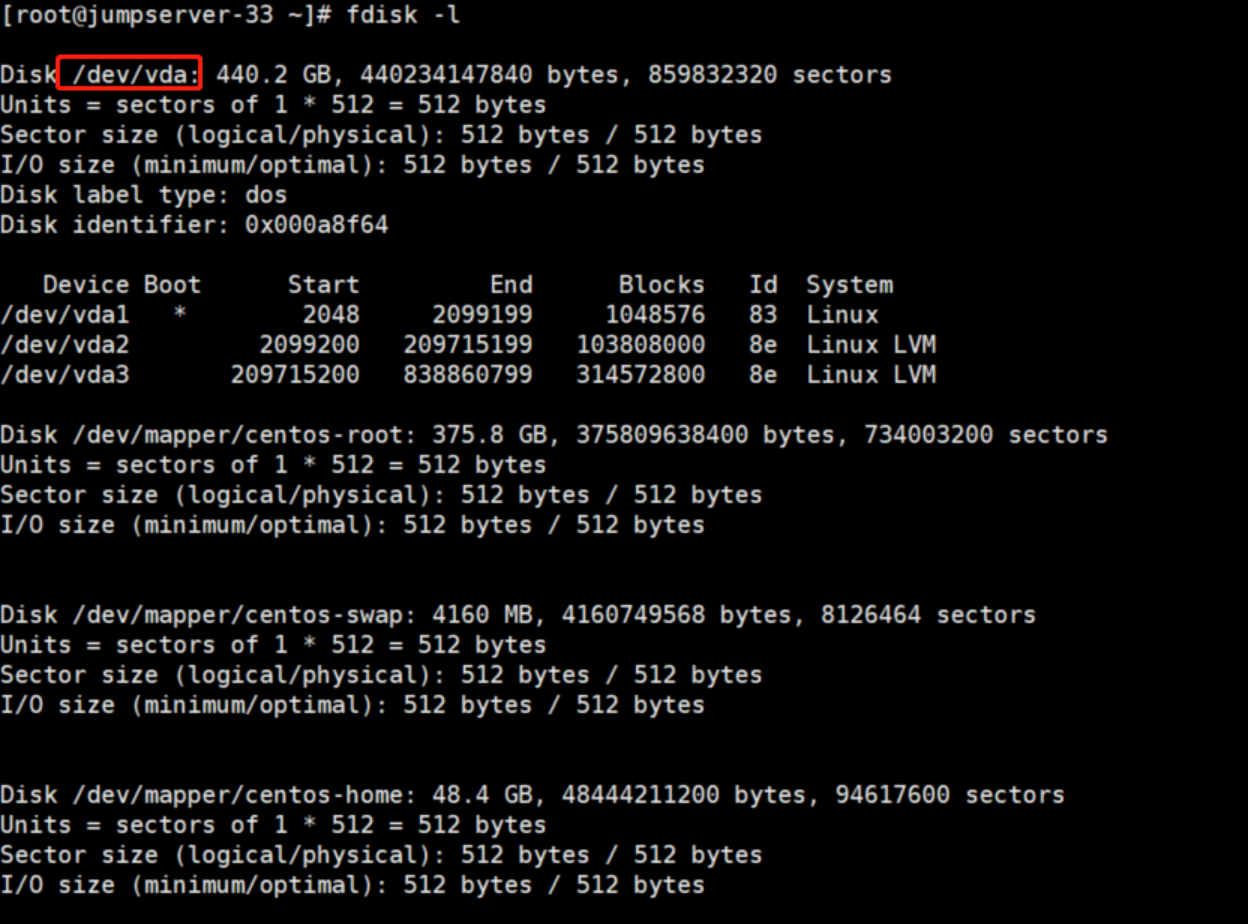
[root@jumpserver-33 ~]# fdisk -l

Disk /dev/vda: 440.2 GB, 440234147840 bytes, 859832320 sectors
Units = sectors of 1 * 512 = 512 bytes
Sector size (logical/physical): 512 bytes / 512 bytes
I/O size (minimum/optimal): 512 bytes / 512 bytes
Disk label type: dos
Disk identifier: 0x000a8f64

   Device Boot      Start         End      Blocks   Id  System
/dev/vda1   *        2048     2099199     1048576   83  Linux
/dev/vda2         2099200   209715199   103808000   8e  Linux LVM
/dev/vda3       209715200   838860799   314572800   8e  Linux LVM

Disk /dev/mapper/centos-root: 375.8 GB, 375809638400 bytes, 734003200 sectors
Units = sectors of 1 * 512 = 512 bytes
Sector size (logical/physical): 512 bytes / 512 bytes
I/O size (minimum/optimal): 512 bytes / 512 bytes


Disk /dev/mapper/centos-swap: 4160 MB, 4160749568 bytes, 8126464 sectors
Units = sectors of 1 * 512 = 512 bytes
Sector size (logical/physical): 512 bytes / 512 bytes
I/O size (minimum/optimal): 512 bytes / 512 bytes


Disk /dev/mapper/centos-home: 48.4 GB, 48444211200 bytes, 94617600 sectors
Units = sectors of 1 * 512 = 512 bytes
Sector size (logical/physical): 512 bytes / 512 bytes
I/O size (minimum/optimal): 512 bytes / 512 bytes
1
2
3
4
5
6
7
8
9
10
11
12
13
14
15
16
17
18
19
20
21
22
23
24
25
26
27
28
29
30
2
3
4
5
6
7
8
9
10
11
12
13
14
15
16
17
18
19
20
21
22
23
24
25
26
27
28
29
30
# 8.开始分区
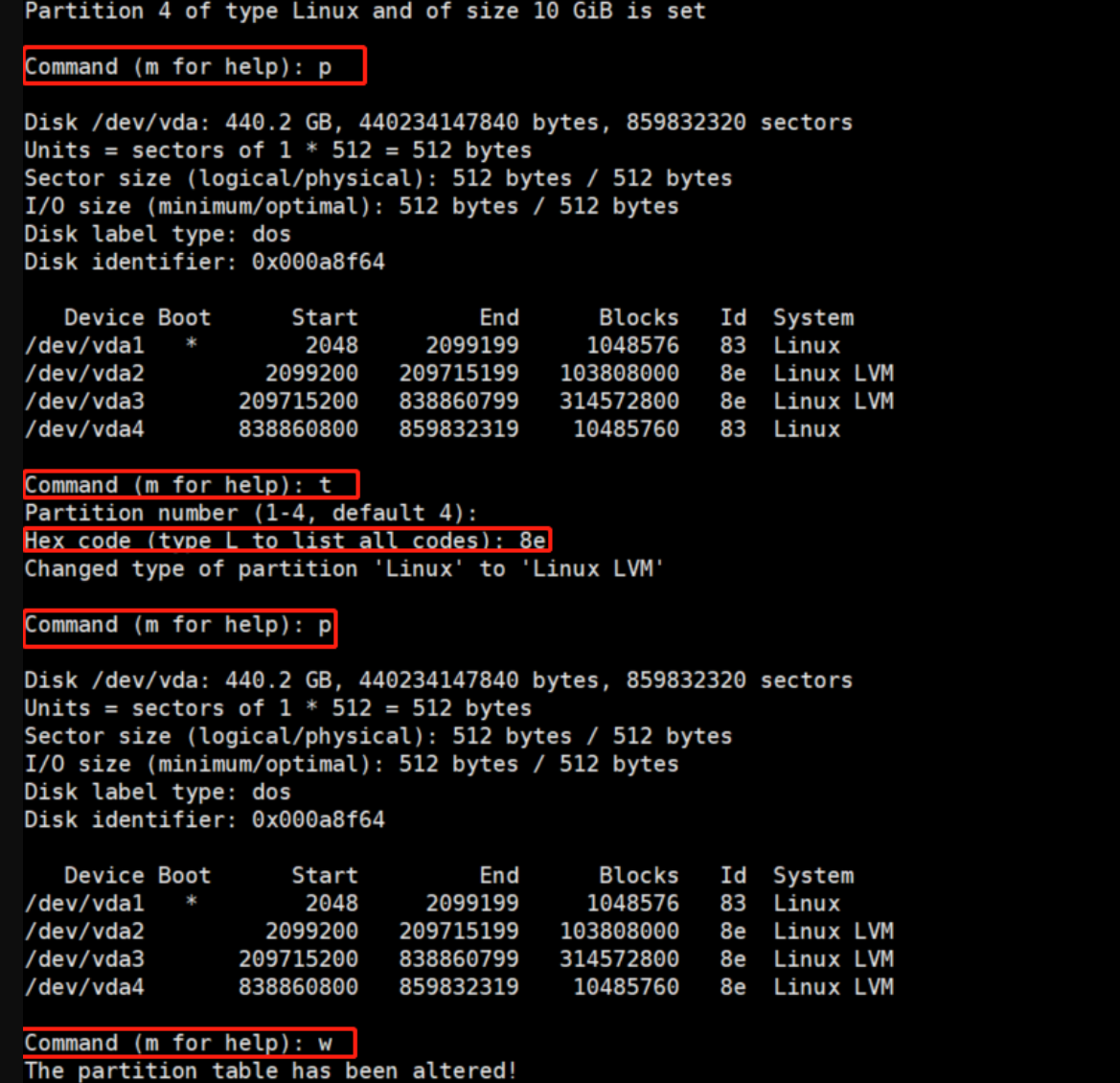
fdisk /dev/vda (因为我们是扩容的vda,所以在vda新增一个分区)
p查询分区
n创建分区,其他默认
p查询分区
t设置新创建的分区格式8e
p查询分区格式是否设置成功
w保存退出
执行partprobe
------------
[root@jumpserver-33 ~]# fdisk /dev/vda
Welcome to fdisk (util-linux 2.23.2).

Changes will remain in memory only, until you decide to write them.
Be careful before using the write command.


Command (m for help): p

Disk /dev/vda: 440.2 GB, 440234147840 bytes, 859832320 sectors
Units = sectors of 1 * 512 = 512 bytes
Sector size (logical/physical): 512 bytes / 512 bytes
I/O size (minimum/optimal): 512 bytes / 512 bytes
Disk label type: dos
Disk identifier: 0x000a8f64

   Device Boot      Start         End      Blocks   Id  System
/dev/vda1   *        2048     2099199     1048576   83  Linux
/dev/vda2         2099200   209715199   103808000   8e  Linux LVM
/dev/vda3       209715200   838860799   314572800   8e  Linux LVM

Command (m for help): n
Partition type:
   p   primary (3 primary, 0 extended, 1 free)
   e   extended
Select (default e): p
Selected partition 4
First sector (838860800-859832319, default 838860800):
Using default value 838860800
Last sector, +sectors or +size{K,M,G} (838860800-859832319, default 859832319):
Using default value 859832319
Partition 4 of type Linux and of size 10 GiB is set

Command (m for help): p

Disk /dev/vda: 440.2 GB, 440234147840 bytes, 859832320 sectors
Units = sectors of 1 * 512 = 512 bytes
Sector size (logical/physical): 512 bytes / 512 bytes
I/O size (minimum/optimal): 512 bytes / 512 bytes
Disk label type: dos
Disk identifier: 0x000a8f64

   Device Boot      Start         End      Blocks   Id  System
/dev/vda1   *        2048     2099199     1048576   83  Linux
/dev/vda2         2099200   209715199   103808000   8e  Linux LVM
/dev/vda3       209715200   838860799   314572800   8e  Linux LVM
/dev/vda4       838860800   859832319    10485760   83  Linux

Command (m for help): t
Partition number (1-4, default 4):
Hex code (type L to list all codes): 8e
Changed type of partition 'Linux' to 'Linux LVM'

Command (m for help): p

Disk /dev/vda: 440.2 GB, 440234147840 bytes, 859832320 sectors
Units = sectors of 1 * 512 = 512 bytes
Sector size (logical/physical): 512 bytes / 512 bytes
I/O size (minimum/optimal): 512 bytes / 512 bytes
Disk label type: dos
Disk identifier: 0x000a8f64

   Device Boot      Start         End      Blocks   Id  System
/dev/vda1   *        2048     2099199     1048576   83  Linux
/dev/vda2         2099200   209715199   103808000   8e  Linux LVM
/dev/vda3       209715200   838860799   314572800   8e  Linux LVM
/dev/vda4       838860800   859832319    10485760   8e  Linux LVM

Command (m for help): w
The partition table has been altered!

Calling ioctl() to re-read partition table.

WARNING: Re-reading the partition table failed with error 16: Device or resource busy.
The kernel still uses the old table. The new table will be used at
the next reboot or after you run partprobe(8) or kpartx(8)
Syncing disks.
-------------
[root@jumpserver-33 ~]# partprobe  # 更新所有硬盘的分区表
1
2
3
4
5
6
7
8
9
10
11
12
13
14
15
16
17
18
19
20
21
22
23
24
25
26
27
28
29
30
31
32
33
34
35
36
37
38
39
40
41
42
43
44
45
46
47
48
49
50
51
52
53
54
55
56
57
58
59
60
61
62
63
64
65
66
67
68
69
70
71
72
73
74
75
76
77
78
79
80
81
82
83
84
85
86
87
88
2
3
4
5
6
7
8
9
10
11
12
13
14
15
16
17
18
19
20
21
22
23
24
25
26
27
28
29
30
31
32
33
34
35
36
37
38
39
40
41
42
43
44
45
46
47
48
49
50
51
52
53
54
55
56
57
58
59
60
61
62
63
64
65
66
67
68
69
70
71
72
73
74
75
76
77
78
79
80
81
82
83
84
85
86
87
88
# 9.LVM磁盘扩展
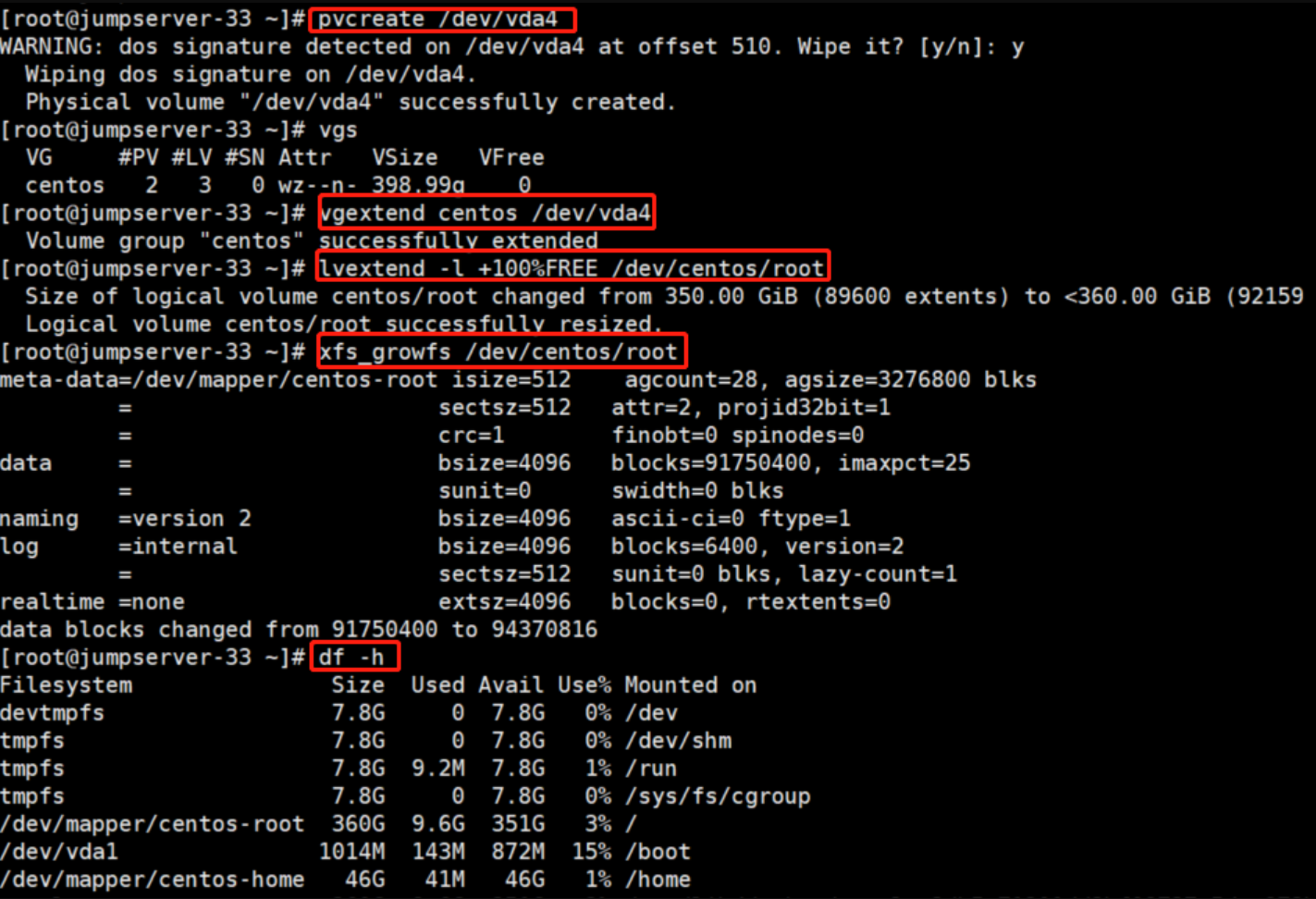
[root@jumpserver-33 ~]# partprobe

--------------------------创建物理卷
[root@jumpserver-33 ~]# pvcreate /dev/vda4
WARNING: dos signature detected on /dev/vda4 at offset 510. Wipe it? [y/n]: y
  Wiping dos signature on /dev/vda4.
  Physical volume "/dev/vda4" successfully created.

--------------------------查询group
[root@jumpserver-33 ~]# vgs
  VG     #PV #LV #SN Attr   VSize   VFree
  centos   2   3   0 wz--n- 398.99g    0

--------------------------扩容
[root@jumpserver-33 ~]# vgextend centos /dev/vda4
  Volume group "centos" successfully extended

-------------------------扩容逻辑卷大小
[root@jumpserver-33 ~]# lvextend -l +100%FREE /dev/centos/root
  Size of logical volume centos/root changed from 350.00 GiB (89600 extents) to <360.00 GiB (92159 extents).
  Logical volume centos/root successfully resized.

-------------------------更新修改到文件系统
[root@jumpserver-33 ~]# xfs_growfs /dev/centos/root
meta-data=/dev/mapper/centos-root isize=512    agcount=28, agsize=3276800 blks
         =                       sectsz=512   attr=2, projid32bit=1
         =                       crc=1        finobt=0 spinodes=0
data     =                       bsize=4096   blocks=91750400, imaxpct=25
         =                       sunit=0      swidth=0 blks
naming   =version 2              bsize=4096   ascii-ci=0 ftype=1
log      =internal               bsize=4096   blocks=6400, version=2
         =                       sectsz=512   sunit=0 blks, lazy-count=1
realtime =none                   extsz=4096   blocks=0, rtextents=0
data blocks changed from 91750400 to 94370816
-------------------------查询
[root@jumpserver-33 ~]# df -h
Filesystem               Size  Used Avail Use% Mounted on
devtmpfs                 7.8G     0  7.8G   0% /dev
tmpfs                    7.8G     0  7.8G   0% /dev/shm
tmpfs                    7.8G  9.2M  7.8G   1% /run
tmpfs                    7.8G     0  7.8G   0% /sys/fs/cgroup
/dev/mapper/centos-root  360G  9.6G  351G   3% /
/dev/vda1               1014M  143M  872M  15% /boot
/dev/mapper/centos-home   46G   41M   46G   1% /home
1
2
3
4
5
6
7
8
9
10
11
12
13
14
15
16
17
18
19
20
21
22
23
24
25
26
27
28
29
30
31
32
33
34
35
36
37
38
39
40
41
42
43
44
2
3
4
5
6
7
8
9
10
11
12
13
14
15
16
17
18
19
20
21
22
23
24
25
26
27
28
29
30
31
32
33
34
35
36
37
38
39
40
41
42
43
44
上次更新: 2026/05/31, 03:30:34